

Many WhatsApp users have searched for reliable ways to find out whether someone has blocked them. Usually, people rely on common signs inside the app. However, those indicators often create confusion and do not always provide accurate answers.
Now, users have started paying attention to a lesser-known WhatsApp feature that may offer another clue. The method uses WhatsApp’s encryption verification system and does not require sending a message or making a call.
Importantly, WhatsApp has not officially confirmed that this feature can detect blocks. Therefore, users should treat the results as indications rather than proof.
Why Traditional Signs Often Create Confusion
When users suspect they have been blocked, they usually look for a few common signals.
These signs often include:
- A missing profile picture
- Messages showing only one check mark
- WhatsApp calls failing to connect
- No visible updates from the contact
However, none of these signs confirms a block.
Someone may change privacy settings, remove a profile photo, switch devices, or temporarily disconnect. As a result, normal account changes can appear similar to blocking.
Because of this uncertainty, many users continue searching for more reliable ways to check.
The Encryption Verification Method Users Are Testing
A newer method focuses on WhatsApp’s encryption verification feature.
Every private WhatsApp conversation uses unique encryption keys. These keys protect messages and help maintain end-to-end encryption.
However, those keys can change in certain situations.
For example:
- A user reinstalls WhatsApp
- A user changes phones
- Another linked device is added
To manage this, WhatsApp includes an Encryption option inside each chat.
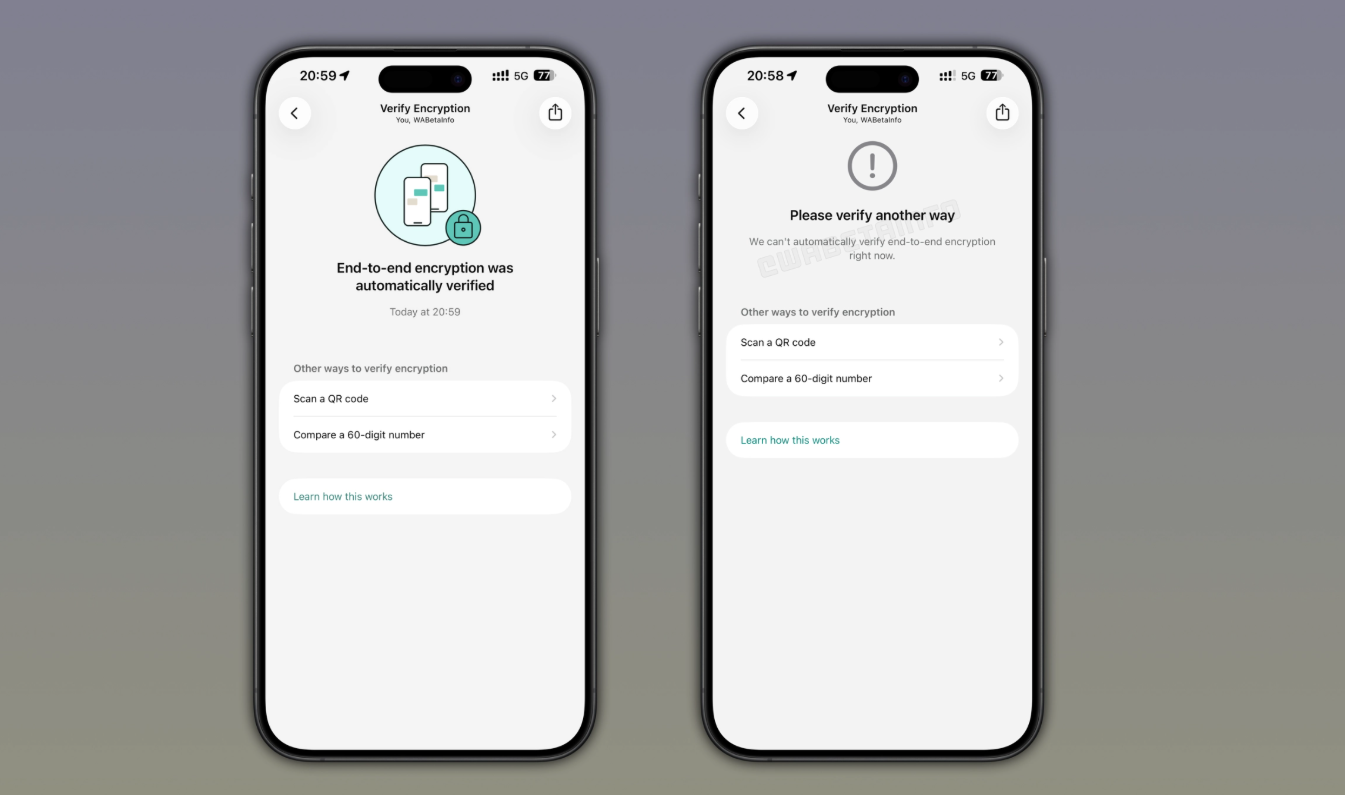
Users can open that section and allow WhatsApp to verify whether the conversation remains protected.
Some users claim repeated verification failures in a specific chat may suggest that the other person has blocked them.
Still, this remains an unofficial observation.
How WhatsApp Encryption Verification Works
Previously, users had to manually confirm chat security.
This process required comparing a 60-digit security code or scanning a QR code with the other participant.
Later, WhatsApp introduced automatic security-code verification to simplify the process.
Now, users can verify conversations automatically without asking the other person to participate.
The process happens quietly and does not notify the contact.
As a result, people see it as a more discreet option than calling or sending messages.
How Users Check Encryption Verification
Users trying this method generally follow these steps:
Step 1: Open the Conversation
Launch WhatsApp and select the chat with the contact.
Step 2: Open Contact Information
Tap the contact’s name at the top of the conversation.
Step 3: Select Encryption
Open the Encryption section.
Step 4: Wait for Verification
Allow several seconds for automatic verification.
If verification completes successfully, the person has likely not blocked you.
However, if WhatsApp repeatedly cannot verify automatically and suggests another verification method, some users interpret that as a possible sign of blocking.
Why This Method Is Not Final Proof
Although the approach appears interesting, users should remain cautious.
WhatsApp has never presented encryption verification as a blocking detector.
Automatic verification may fail for several reasons.
These may include:
- Temporary connection issues
- Recent encryption-key updates
- Device synchronization delays
- Technical limitations inside the app
Therefore, a failed verification result should not be treated as confirmation.
Some users report consistent failures in chats where blocking had already occurred. Even so, those experiences remain anecdotal.
Could WhatsApp Change This Feature Later?
Like many platform features, encryption verification may evolve.
WhatsApp could adjust how automatic verification works in future updates. Consequently, the current behavior may not remain the same over time.
For now, users should view encryption verification as one possible indicator rather than a definitive answer.
Until WhatsApp officially explains the feature’s role in blocking detection, privacy settings and account changes remain equally possible explanations.