
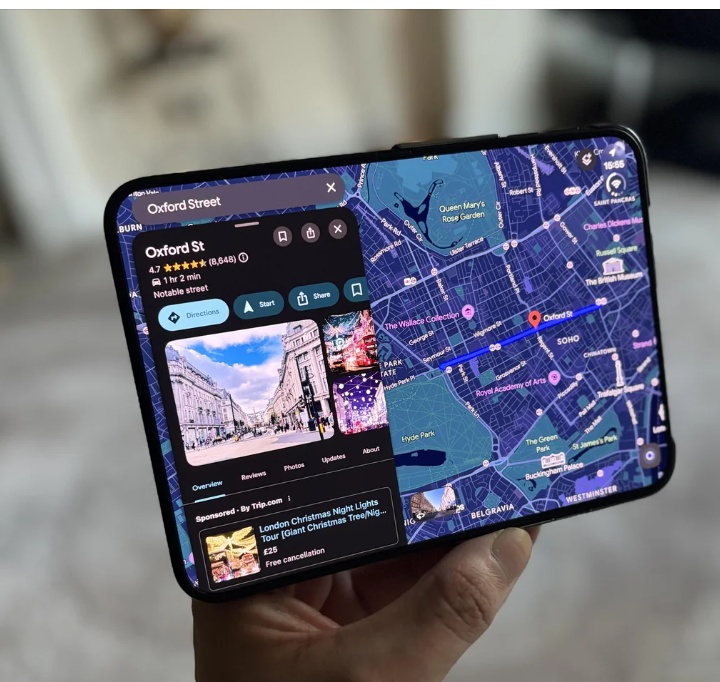

Google Maps has received an important update that makes the app fully compatible with Apple’s dual-display iPhone Duo. The latest version addresses display issues that previously affected the navigation experience across both screens.
With version 26.44.4, Google Maps now uses the device’s displays more effectively. The update introduces a redesigned layout for the inner screen, bringing navigation and search controls into a more convenient arrangement.
Google Maps Update Brings Full iPhone Duo Support
Although the iPhone Duo has been available for some time, several iOS applications still lack proper support for its dual-display design. However, Google Maps has now joined the list of apps optimised for the device.
The updated version 26.44.4 reportedly fixes several display-related problems. Previously, Google Maps appeared slightly shifted towards the left on the outer display.
This happened because the application struggled to accommodate the new position of the iOS dock. Meanwhile, the inner display continued showing the standard iPhone interface.
Users could move the application towards either side of the larger screen. However, this arrangement left a considerable portion of the display unused.
The latest update addresses these limitations by allowing Google Maps to fill both displays more effectively.
Inner Display Gets a Wider Google Maps Layout
The biggest improvement appears when users open the iPhone Duo and access its inner display. Google Maps now offers a wider interface that makes better use of the available screen space.
The search box and navigation menus appear on the left side. Meanwhile, the map or satellite view stretches across the remaining display.
This arrangement provides an experience similar to Google Maps on an iPad. Consequently, users can access navigation controls without sacrificing valuable viewing space.
The outer display also benefits from the update, although the visual improvement remains relatively minor. The application now fits the screen more neatly without the previous alignment issue.
Street View Also Benefits From the Update
Google Maps has also improved its Street View experience on the iPhone Duo. The wider inner display allows users to view Street View alongside the map.
By default, Street View occupies the left portion of the screen. The map appears on the right, allowing users to maintain their geographical reference while exploring locations.
However, users cannot apparently switch the default positions of these two views. They can still expand Street View to occupy the entire display.
Another useful feature appears when users fold the iPhone Duo while viewing Street View. The application automatically transfers Street View to the outer display.
Additionally, a close button allows users to return to the map interface.
Google Maps Version 26.44.4 Introduces the Changes
Google’s App Store release notes mention only “bug fixes”. However, the latest version reportedly includes significant improvements for iPhone Duo users.
The update demonstrates how developers are adapting their applications to Apple’s dual-display design. Although the changes do not introduce major new navigation features, they improve the overall usability of Google Maps.
For users who regularly switch between the outer and inner displays, the redesigned interface offers a more consistent experience.
With this update, Google Maps addresses one of its noticeable compatibility problems on the iPhone Duo. The improved layout also makes navigation, map exploration and Street View more convenient on the larger display.
For the latest updates, visit and follow The Truth International website (www.thetruthinternational.com) and subscribe to the YouTube Channel.